These are the top 17 most common mixing mistakes to avoid. Correcting them will greatly improve your audio mastering results, and make your music sound professional and radio ready.
Since 1999, I’ve worked with over 8,000 clients and below are the mixing problems I see most often. I’m not going to get into advanced mixing techniques in this article, but I will mention a few basic solutions for the most common mixing mistakes I see daily (in no specific order), which will ultimately make your mixes and masters sound great! For more details checkout out Song Mixing Secrets for detailed info.
Mixing Mistake #1 – WRONG FILE TYPE!
What To Submit – .WAV File – 44.1 or 48khz / 16-32bit (preferably 24bit) OR .Aiff file
No one wants (or needs) to work with a HUGE 1GB 96khz file. Don’t send your mastering engineer a 12GB album! It’s overkill since CDs are 44.1khz, and mp3s are even lower quality. One exception – You’re working with Mastering for Itunes.
Mixing Mistake #2 – Plug-Ins On The Stereo/Main Out
If your songs are going to be mastered, NOTHING should be on your stereo/ main out. No limiter, no loudness maximizer, no EQ, no spectral enhancer. This is my job in the audio mastering process. I set everything where it needs to be based on your style of music. Then you tell me if you prefer a little more a less of something, and I’ll adjust as necessary.
I don’t want a partially mastered song. Most of the time when a client tries to do this, they go way over on several sonic qualities, and I cannot correct these mistakes.
Mixing Mistake #3 – The Songs Peak Too High, Are Distorted, Not Enough Headroom
How much headroom should you leave in your mix?
Here’s the correct amount of headroom you should leave, using detailed graphic examples.
Note – It doesn’t matter what DAW software you use FL Studio, Pro Tools, Logic, Reason, Cubase, Sonar or Ableton, the headroom examples and instructions apply to all of them.
VIDEO – Analyzing A .Wav File
There are two factors to consider when exporting your final mix for mastering:
A. Peak level – The absolute highest level the output signal reaches.
B. Dynamic range – The range between the highest level and the lowest level of the output signal.
PEAK LEVEL
The loudest part of your song (peak level) should be around -3db to -5db BELOW 0 level. This is considered +3db to +5db of headroom. This is the ideal amount of headroom for you should leave for mastering.
How To Create Headroom Before Mastering In Your Mixes
In your mix, never let your levels go over 0db on the main/stereo out meter, OR on ANY of your individual instrument or vocal tracks.
Note – For the record, at times you can peak at 0 level or slightly over if its quick hits like a drum, hi-hat, etc. and they don’t distort. But again, there’s still no reason to go over-level.
Remember, loudness maximization is done in mastering NOT mixing. DO NOT keep raising your faders way over zero level, totally distorting everything, to match the volume level of your favorite song. Yes, you matched the volume level, but now you have a scratchy distorted mess!
If your mixes are going to be mastered by someone else, the mastering engineer prefers a lower level, more dull sounding mix that he or she can bring up to where it should be. NOT an over-level scratchy distorted super bright mix. NO ONE can do anything with this! It’s a trainwreck!
If you listen to the before samples on my website, you can hear what a song is supposed to sound like BEFORE mastering. What a raw mix is supposed to sound like. Did you notice they’re not real loud, or distorted, or super bright or bassy? This allows me to bring them up to where they should be in the after samples.
Sometimes I receive songs that correctly have +3db of headroom, but the vocals or certain instruments are still distorted. This is because the “individual tracks” were mixed over-level. Nothing should ever go over 0db on any channel of your entire mix!
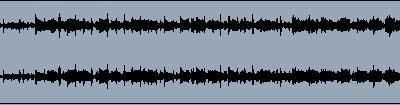
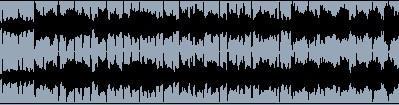
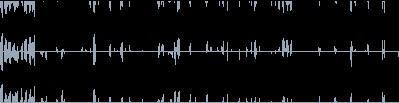
I get so many over-level submissions, I’ve decided to show graphics of how your .wav or.aiff files should look. These are your ideal mastering levels in dbs.
1. This .wav file peaks at -6db. This .wav has too much headroom before mastering. But, I can still work with this by just gaining it +3-4dbs.
2. This .wav file peaks at -3db. This is the ideal amount of headroom before mastering.
3. This .wav file peaks at 0db but is fine because there are no distorted flat spots in the wave. The high hats are hitting at 0db and everything else drops down, leaving good dynamic range. I can work with this.
4. This .wav is +3db over level. All the flat spots you see are distortion. You can’t just jack up your levels past 0 and distort everything to make your song louder. Loudness is increased in mastering. Do not submit a file that looks like this.
5. Once a week, we get at least one file that looks like this! Let’s call this the“trainwreck file.” +6db over-level and totally distorted from beginning to end.
I can’t do anything with this! No one can!!
6. This is an interesting file. We get this quite often too. It’s the “train-wreck file” we mentioned above, gained down -9db. It’s completely distorted, but its -3db under 0 level.
A file where the mixer channels are over 0 level, but the main stereo out is -6db would look exactly the same.
I can’t use this either. Once your song is distorted and over level, you can’t just gain it down. All you’re doing is making a distorted file quieter.
You have to be under 0 level on the stereo out, and on all the mixer board channels when exporting the original .wav file.
DYNAMIC RANGE
As a song plays, the output meter constantly goes up and down. Dynamic range is the area between the peak level (when the meter is up) and the low level (when the meter is down). Roughly, 3db to 5db of movement between the high and low meter level is average, but this does depend on the genre of music.
With a heavily compressed/limited or over-level mix, the meter will not go up and down more than 1db, if any. Not good.
The reason I need dynamic range and headroom in mixes is because compressed/limited or over-level mixes already have music content removed from them, which greatly limits what I can do in mastering.
“Leaving no dynamic range is comparable to a woman who goes to a hair stylist with only 3 inches of hair. The stylist would be “very” limited with what she could do. 10 inches and the sky’s the limit!”
Mixing Mistake #4 – Mix Needs To Sound Fuller, Mix Sounds Too Thin
There are four thing that make a mix sound fuller.
A. The LOW bass and UPPER-MIDS must have the proper thickness/boominess.
B. The vocal and instrumentation amounts have to be sufficient for the arrangement.
C. Don’t roll of too much bass from your mid-frequency tracks. I get in a lot of songs where the lead vocal and lead guitars (or synths) are all high bass filtered around 500hz which leaves you with a thin tinny sound.
D. You tracks are properly panned across the stereo spectrum. If you have 4 guitars all panned dead center, it’s going to sound like you have ONE loud mono guitar, which is not a full thick guitar sound. E. I explain this all in great detail in Song Mixing Secrets.
Mixing Mistake #5 – Bass Too Loud In Mix, Mix Sounds Muddy Or Too Boomy
35% of the hip hop songs I get in are very bass heavy, they go over 0 level, and are usually distorted too. The big bass you’re looking for is adjusted in the mastering process, along with a boost in overall song volume level. Yes, all songs have bass in them, just don’t go WAY too far for your genre.
Mixes that sound dull are actually GOOD for mastering! Listen to the BEFORE mix samples on my before and after samples page. Notice how the mixes are either average brightness and bass, or dull (slightly muffled).
As a mastering engineer, it’s easy to make a dull song brighter and a set it exactly right where it should be. But a super bright song that requires a big EQ cut, many times will leave you with a flat lifeless master that has no sparkle.
Mixing Mistake #6 – Mix Sounds Bad On Car Stereo, Weak Stereo Field
The car is the ultimate judge of the stereo field. If you didn’t do a good job with it, your song will sound like its a foot wide, playing right above the stereo. Not a full wide sound that blasts out from the left door all the way across to the right door.
Most amateur mixing engineers think stereo reverb is the solution to a mix with a weak stereo field. WRONG! If you pan everything centrally, and then put stereo reverb on it, all you’ll have is a weak reverb echo on the outside of the stereo field while the meat of the song is all up the middle.
Yes, you can use delays that bounce to the outsides, the Haas effect is great to, BUT the simple rule I learned many years ago and follow is this.
If you want to be able to hear something on the outsides of the stereo field, YOU HAVE TO HAVE SOMETHING PANNED THERE!!
Problem – The vocals are too boomy and interfere with the kick and bass clarity.
Solution – Roll off the bass in your vocals. Use a high pass filter on your vocal track anywhere from 150hz-300hz. Move around in that range to see what sounds best. Unless you’re singing like Barry White, you don’t need that low frequency in your vocal track.
Mixing Mistake #8 – Vocals Not Loud Enough In Mix
I would say 50% of the rock songs I get in, the vocal volume is just too low. Maybe 25% when it comes to hip hop.
This is a common technique in rock music since many times the singer is poor and tries to hide his vocals under the music. But, If I can’t understand HALF of what you are singing, this is a WRONG mixing technique!
You don’t know how many times I’ve pointed out this error to a client, telling them I honestly can’t understand HALF the vocals in the song. I couldn’t even guess them. And they reply, “Oh, that’s ok. We want the listener to have figure out some of the vocals?” REALLY? I can see a few words, but how many songs on the radio have you heard where half tof he vocals are impossible to understand? The answer is – NEVER! This isn’t a word puzzle, it’s a song!
Probably the worst song I’ve ever heard on the radio, maybe 5% of the words were tough to understand. And many times that was because of a phrasing irregularity, not because the vocal volume level was -5dbs too low.
When your done with a your songs, ask a friend if they can unsderstand the words and have them repeat them back to you. See if they get them right!
Mixing Mistake #9 – Vocals With Sharp Ssss Sound
If the Sss sounds in your vocals is the least bit sharp before mastering, it will be unbearable after mastering. Crank up your mix loud and apply a De-esser to your vocal track if needed.
Note – The good thing about a de-esser is it’s pretty much non-destructive. If you were to use it moderately on a vocal track and the track really didn’t need it, it won’t affect it much because there’s no Ssss problem to be corrected.
Mixing Mistake #10 – Mix Sounds Too Harsh, Very Bright Mix Or Tinny Mix
Roughly 25% of the mixes I get in, the client cranks up the high-end EQ or overuses a spectral enhancer, thinking they’re getting that clear professional radio quality sound. This mix will never make a great master because it’s already much brighter than it needs to be.
When I have to cut a lot of high-end EQ, the song loses its sparkle and clarity. It also prevents me from using frequency phase correcting tools. I’m not saying you shouldn’t EQ your mixes at all, just remember a slightly dull mix can be turned into a great master, but an overly bright one can’t.
Listen to your mix. If you think your mix is too bright, it probably is.
Mixing Mistake #11 – Tracks Not Ready For Mastering
Tracks not synced, fades, which effects to use, how much compression, etc. is covered on this page –
Mixing Mistake #12 – Using A Bad Mixing or Mastering Engineer
I had to throw this in here. Lol! Too many artists, for whatever reason, choose a mixing or mastering engineer that is either inexperienced, or is pretty much workingin at a big corporate studio. Go with an engineer that has worked with over 8,000 clients, treats your music like it’s his own, and delivers fast amazing results. ME! Thanks for checking out my low rates. I’ll do an amazing job for you!
Mixing Mistake #13 – Mixes Not Checked At High Volume Levels
During audio mastering, most (if not all) songs are going to be volume boosted to some extent. This magnifies whatever is in your mix.
Many times a client sends me a song mix that’s very low level, maybe -8dbs to -12dbs headroom. This song will have to be heavily boosted. Once I boost it, there could be obvious errors that stick out. Many times the mix is shrill. But the mixer doesn’t know this.
Why is this so common? Since the song was mixed and monitored at such a low volume level, the sound engineer can’t tell what it will sound like when turned up much louder. They’re missing how the mix really sounds.
Solution – Crank up your system volume output loud to hear how your mix sounds, and then adjust your mix as needed. Not for hours. Just a 1-2 minute 100db check. If it’s unbearable bright or has super bass that runs over the entire song, you have to correct this.
And I repeat, If you think your mix is too bright, it probably is.
Speakers are way too close. This guy can’t possibly crank this up to 100dbs and make adjustments, at the same time.
This is better. The top speakers are 5 feet away. Also, the engineer can roll back a bit and take in the entire stereo spectrum of the mix. This is why you NEVER see top a level sound engineer with engineering with the setup above.
Mixing Mistake #14- Noisy Tracks Or Noisy Song Mix
Problem – There’s a constant low-end hum or high-end hiss on an instrument track. This track noise eats up space, slightly clouding up the entire song.
Solution – Listen through your entire song for noise. Sometimes the cause is a mic being boosted to loud during recording or an instrument gained or boosted to high. Find your noisy tracks and either eliminate them, or EQ high or low pass filter them. Or use a noise gate.
Noise/hiss is easily noticed at the beginning and sometimes at the end of songs when instrumentation is low (or has ended). It’s not as noticeable when the meat of the song is playing. But that noise is always present and is slightly clouding up your entire song.
Mixing Mistake #15 – Kick Drum And Bass Guitar Are On Top Of Each Other In The Same Frequency Range
Problem – Both the bass guitar and kick drum are in the same low-frequency range (50hz-75hz). They’re washing (phase canceling) each other out and one (usually the kick) can’t be heard very clearly.
Solution – When you initially arrange your songs, you have to decide which instrument will be in the low-frequency 50-75hz range (usually the kick) and which will be in the mid-low 100hz-250hz (usually the bass). If the kick is low, then the bass needs to be mid-low (and vice versa) not both in the same frequency range. This is just the basics, but crucial.
Note – This is more of an “arrangement” problem than it is a “mixing” problem. You have to select the right instruments in the correct frequency ranges in the first place.
Mixing Mistake #16 – High/Sharp Instrument Becoming An Annoyance
When mixing, remember that after I master your songs, they’ll be a lot louder and clearer. There’s no need to make higher frequency instruments (synth, violin, chimes, etc.) real loud. These bright instruments don’t compete with too much in the mix, so they have no problem cutting through. Many times the sound engineer doesn’t factor this in and mixes them in too loud.
Remember, if these instruments are still too bright after mastering, you can upload a new adjusted mix and I’ll swap it out at no extra charge.
Solution – If the Sss sounds in your vocals is the least bit sharp before mastering, it will be unbearable after mastering. Apply a De-esser to your vocal track if needed.
Mixing Mistake #17 – Properly MASTERING Your Song
If you’ve made it this far, you pretty much know how to MIX your songs properly. Now you need to know how to MASTER your own music properly. It’s not all about mixing. EVERY song EVER on the radio has been mastered. Has yours been? Here I explain everything you need to know in Audio Mastering Secrets.
Step-by-step details on how to correct the errors you’ve read about in these reviews. Audio Mastering Secrets was the best selling Audio Mastering book in 2021 & 2020. Song Mixing Secrets wasn’t too far behind either.
I’ve read online so many times, “How long does it take to learn mixing and mastering?” Well, you can GREATLY reduce your learning curve time by getting 20+ years of proper Mixing & Mastering training from someone who’s already done it. And, you can get all this information in your hands in a matter of minutes! Isn’t your career worth half the price of a pizza ?