+3dbs to +6dbs of headroom is the standard recommended amount, but many times a song with more or a little less headroom can still be mastered with no problems.
But, it really makes no sense to give a mastering engineer a mix with 0dbs of headroom and risk the chance that it’s slightly distorted. There’s no reason to do it because overall song volume is done in the mastering process, not in mixing.
Note – It doesn’t matter what DAW software you use FL Studio, Pro Tools, Logic, Reason, Cubase, Sonar or Ableton, the headroom examples and instructions apply to all of them.
There are two factors to consider when exporting your final mix for mastering:
A. Peak level – The absolute highest level the output signal reaches.
B. Dynamic range – The range between the highest level and the lowest level of the output signal.
Video – Analyzing Your .Wav Files
PEAK LEVEL
The loudest part of your song (peak level) should be around -3db to -5db (below 0 level). This is considered +3db to +5db of headroom. This is the ideal amount of headroom for mastering that you want to leave.
How To Create Headroom Before Mastering In Your Mixes
In your mix, never let your levels go over 0db on the stereo out (main out) meter, OR on ANY of your individual instrument or vocal tracks.
Note – For the record, at times you can peak at 0 level or slightly over if its quick hits like a drum, hi-hat, etc. and they don’t distort. But again, there’s no reason to go over-level.
Remember, loudness maximization is done in mastering NOT mixing. DO NOT keep raising the fader on the stereo out (main out) way over zero level, totally distorting the song, to match the volume level of your favorite song. Yes, you matched the volume level, but now you have a scratchy distorted mess!
If your mixes are going to be mastered by someone else, the mastering engineer prefers a lower level, more dull sounding mix that he or she can bring up to where it should be. NOT an over-level scratchy distorted super bright mix. NO ONE can do anything with this! It’s a trainwreck! If you listen to the before samples on my website, you can hear what a song is supposed to sound like BEFORE mastering. What a raw mix is supposed to sound like. Did you notice they’re not real loud, or distorted, or super bright or bassy? This allows me to bring them up to where they should be in the after samples.
Sometimes I receive songs that correctly have +3db of headroom, but the vocals or certain instruments are still distorted. This is because the “individual tracks” were mixed over-level. Nothing should ever go over 0db on any channel of your entire mix!!
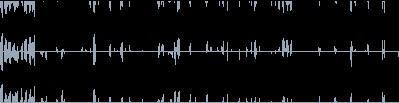
I get so many over-level submissions, I’ve decided to show graphics of how your .wav or.aiff files should look. These are your ideal mastering levels in dbs.
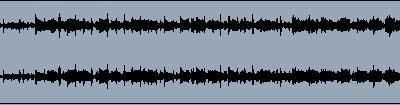
This .wav file peaks at -6db. This .wav has too much headroom before mastering. But, I can still work with this by just gaining it +3-4dbs.
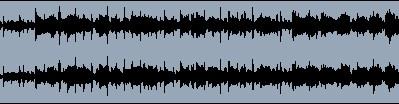
This .wav file peaks at -3db. This is the ideal amount of headroom before mastering.
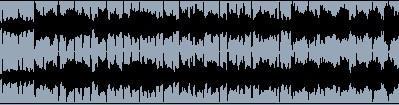
This .wav file peaks at 0db but is fine because there are no distorted flat spots in the wave. The high hats are hitting at 0db and everything else drops down, leaving good dynamic range. I can work with this.
This .wav is +3db over level. All the flat spots you see are distortion. You can’t just jack up your levels past 0 and distort everything to make your song louder. Loudness is increased in mastering. Do not submit a file that looks like this.
Once a week, we get at least one file that looks like this! Let’s call this the “trainwreck file.” +6db over-level and totally distorted from beginning to end.
I can’t do anything with this. No one can!!
This is an interesting file. We get this quite often too. It’s the “train-wreck file” we mentioned above, gained down -9db. It’s completely distorted, but its -3db under 0 level.
A file where the mixer channels are over 0 level, but the main stereo out is -6db would look exactly the same.
I can’t use this either. Once your song is distorted and over level, you can’t just gain it down. All you’re doing is making a distorted file quieter.
You have to be under 0 level on the stereo out, and on all the mixer board channels when exporting the original .wav file.
Unfortunately, many times the recording studio gives you the “train-wreck” file and you’re stuck with it. Gaining it down yourself does nothing.
And Of Course If You Want Your Songs To Sound AMAZING! Check out my low Online Mastering Prices. Incredible results at an affordable price!
DYNAMIC RANGE
As a song plays, the output meter constantly goes up and down. Dynamic range is the area between the peak level (when the meter is up) and the low level (when the meter is down). Roughly, 3db to 5db of movement between the high and low meter level is average, but this does depend on the genre of music.
With a heavily compressed/limited or over-level mix, the meter will not go up and down more than 1db, if any. Not good.
The reason I need dynamic range and headroom in mixes is because compressed/limited or over-level mixes already have music content removed from them, which greatly limits what I can do in mastering.
“Leaving no dynamic range is comparable to a woman who goes to a hair stylist with only 3 inches of hair. The stylist would be “very” limited with what she could do! 10 inches and the sky’s the limit!”
If you’ve made it this far, you now know how much headroom you should have in your mixes. Now you need to know how to properly MASTER your own music.
Should Your Mix Sound Close To A Mastered Song?
DEFINITELY 100% NO!! I’ve actually seen a few sound engineers online say the opposite. They say to make your mix sound as close as possible to a finished master. “All you want the mastering engineer to do is make the song louder.” These comments are based on common sense and theory, NOT on real world experience working with thousands of clients (like I have)!
If the only thing your songs really needed was for the mastering engineer to make them louder, why not just make them louder yourself and save the money? Duh! No, pay someone $500 to do it in 15 minutes. I want that job! Note – This section is basically a tip for those of you working with clients or if you plan on submitting your mixes to a mastering engineer.
Here’s why you don’t tell clients to partially master their own songs:
1. Because they’re paying an experienced mastering engineer to properly do the entire job. Here’s a non-music example. Before you get your car detailed, do you clean it spotless inside and out, but leave only the windshield dirty, so that’s all the car detailer has to do is wash your windshield and he’s done? NO! That doesn’t even make any sense.
You’re paying for a car detail and you want every process that comes with it. That’s their specialty and you want their expertise in every area, not just the windshield washing process. The same goes for audio mastering.
2. Mixing is not mastering. For a song to sound like a commercially mastered song on the radio you MUST use effects on the stereo/main out bus. When you do use effects on the stereo/main out bus you are mastering not mixing. And you’re not supposed to partially master your songs if they’re going to a mastering engineer. Read the paragraph above again.
3. And the #1 reason is THEY CAN’T DO IT! They don’t have the knowledge, skills, replicating abilities, etc. That’s why they’re looking for a mastering engineer to begin with!
I explain to my clients to submit a mix that’s clean, but slightly dull with lower overall volume levels. That way I can bring everything up to where it needs to be. Nothing on the stereo/main out bus.
In the past, before I was giving this info, do you know what my clients would send me? I would say half the submissions were partial masters where the clients were trying to make them sound radio ready. The problem was they were TERRIBLE! Way over-level, distorted, super bright and/or super bass, way too much compression, etc. Many times they had everything wrong!
In a perfect world, yeah send me a song that’s already mastered and I don’t have to do anything to it. But I know from years of experience working with actual people that this is a very unrealistic request. Most can’t do it, that’s why they’re looking for a mastering engineer to begin with!
I’ve also heard the comment that mastering is taking all the songs on a CD and making them all sound similar. Really? That’s all mastering is? So, I’m supposed to take the best mix on the CD and make all the other songs sound just like it? That doesn’t even make any sense! What if the best mix on the CD sucks?
What if someone gives me only one song (which happens daily)? It can’t be mastered because there isn’t an entire CD?
I make every song on the CD sound as close as possible to a commercial industry standard song. Each song is mastered to sound the very best it can, regardless of past or future songs on the CD. Also, every song is mixed differently and requires different actions to achieve this. After I do this, all the songs on the CD are comparable in every sonic area. Audio mastering is taking a mix and bringing it up to commercial industry standards.
Step-by-step details on how to correct the errors you’ve read about in these reviews. Audio Mastering Secrets was the best selling Audio Mastering book in 2021 & 2020. Song Mixing Secrets wasn’t too far behind either.
I’ve read online so many times, “How long does it take to learn mixing and mastering?” Well, you can GREATLY reduce your learning curve time by getting 20+ years of proper Mixing & Mastering training from someone who’s already done it. And, you can get all this information in your hands in a matter of minutes! Isn’t your career worth half the price of a pizza ?